First published on this blog on July 7, 2018, by Dimitri DO BAIRRO, and put back online in November 2026 as it was written. Package versions and commands date from 2018: check the current documentation before reusing them.
Introduction
Today, it's a sun day and I'm pretty happy to write this tutorial to show you how it's easy to install an API gateway in a Kubernetes cluster.
What's an API gateway?
An API gateway is a programming service in front of an application programming interface (API) which filters the traffic. This front-end service is useful when you have a Microservice architecture pattern.
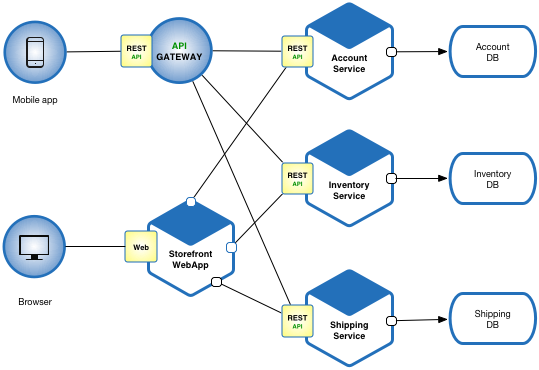
Microservice architecture
API gateways can be used to limit traffic and enforce security policies. In addition to combining a number of APIs with potentially different interfaces in a unified presentation interface, separating the interface and the API has a number of advantages. When an API contains all the necessary functions, ease of use can be improved by updating the gateway interface. Because the API Gateway is separate, it can be updated while avoiding changes to an API that could result in an unexpected operation. The frontal nature of an API gateway allows the gateway to provide new languages while the hidden APIs remain intact, rather than updating multiple APIs separately.
Why using Kong?

It's not just because I'm loving monkeys... In comparaison of other API gateways, Kong offer many advantages:
- Radically Extensible
- Multi store (Postgresql or Cassandra)
- Blazingly Fast
- Open Source (+17k stars, 110 contributions)
- Platform Agnostic
- Cloud Native
- RESTful APIs
- Many plugins
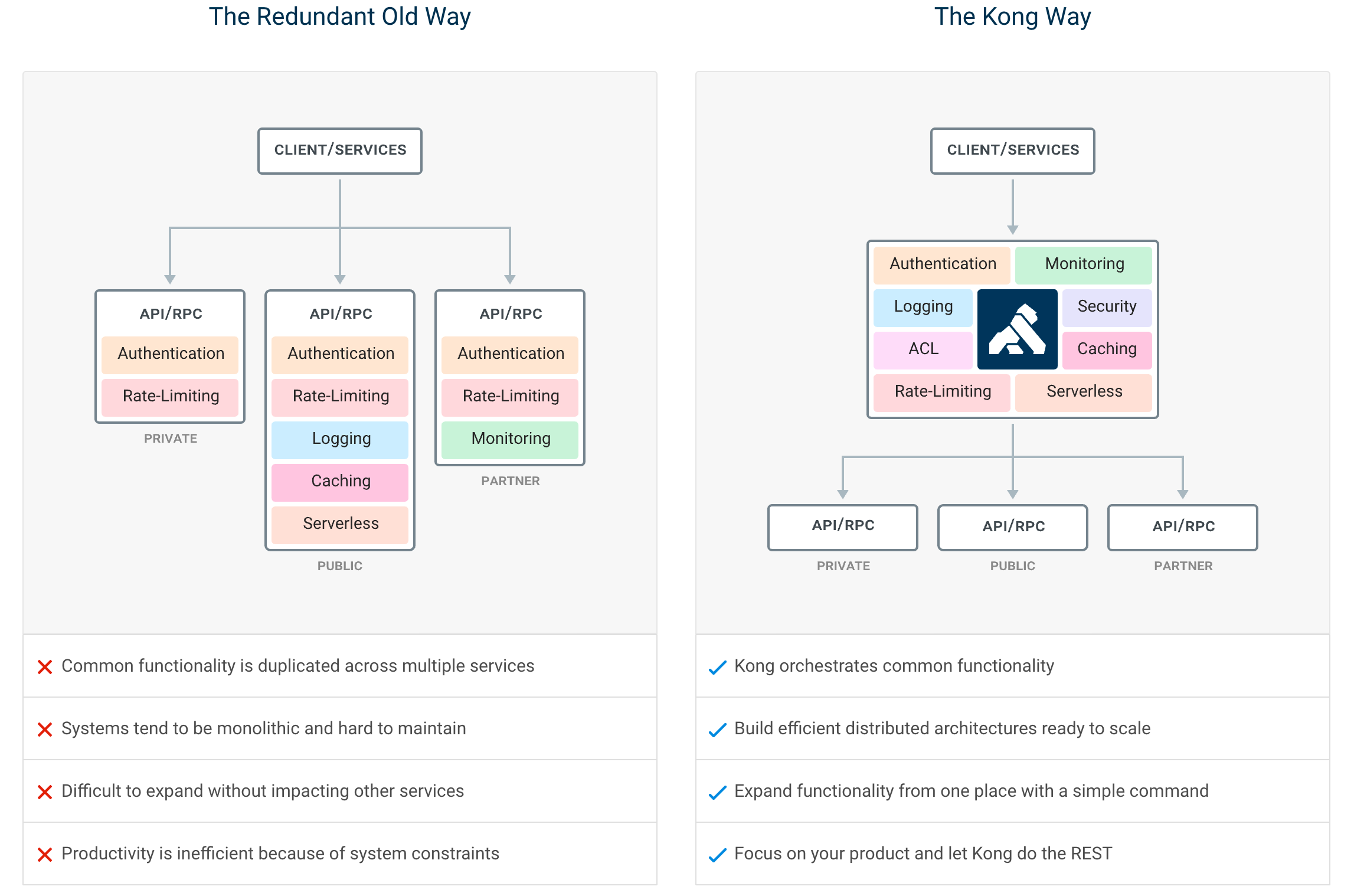
Kong infrastructure example
In this article, we'll use the open source Community Edition.
It's time!
To be installed, Kong just need a datastore initialized. In this article, I'll use PostgreSQL because this service will be shared with micro services (later).
In first, check your cluster status.
$ kubectl cluster-info
Kubernetes master is running at https://163.172.XXX.XXX:6443
KubeDNS is running at https://163.172.XXX.XXX:6443/api/v1/namespaces/kube-system/services/kube-dns:dns/proxy
Clone this official kong-dist-kubernetes repository.
$ git clone git@github.com:Kong/kong-dist-kubernetes.git
$ cd kong-dist-kubernetes
Create the PostgreSQL service.
$ kubectl create -f postgres.yaml
If you don't my PostgreSQL constraint, prefer Cassandra datastore because it's better solution for scalability.
Now, create the ephemeral migration job.
$ kubectl create -f kong_migration_postgres.yaml
When the migration is done, you can remove it.
kubectl delete -f kong_migration_postgres.yaml
If all pods are running, you can now install Kong.
$ kubectl create -f kong_postgres.yaml
You should have a similar output if you check your pods status:
$ kubectl get all --all-namespaces
NAMESPACE     NAME                                  READY     STATUS    RESTARTS   AGE
default       pod/kong-rc-86f48cd777-cm468          1/1       Running   0          1h
default       pod/kong-rc-86f48cd777-z2zfr          1/1       Running   0          1h
default       pod/kong-rc-86f48cd777-zzh2n          1/1       Running   0          1h
default       pod/postgres-grj5k                    1/1       Running   0          1h
...

default       service/kong-admin       LoadBalancer   10.106.236.226   <pending>     8001:32713/TCP   1h
default       service/kong-admin-ssl   LoadBalancer   10.99.61.45      <pending>     8444:30539/TCP   1h
default       service/kong-proxy       LoadBalancer   10.96.235.85     <pending>     8000:32459/TCP   1h
default       service/kong-proxy-ssl   LoadBalancer   10.101.176.45    <pending>     8443:31012/TCP   1h
default       service/postgres         ClusterIP      10.103.191.155   <none>        5432/TCP         1h
...

NAMESPACE     NAME                            DESIRED   CURRENT   UP-TO-DATE   AVAILABLE   AGE
default       deployment.apps/kong-rc         3         3         3            3           1h
...

NAMESPACE     NAME                                      DESIRED   CURRENT   READY     AGE
default       replicaset.apps/kong-rc-86f48cd777        3         3         3         1h
...
Ok, but how to check if the service really runs?
If like me your have a remote remote cluster proxify your connection.
$ kubectl --kubeconfig ~/.kube/config proxy
Starting to serve on 127.0.0.1:8001
Open your browser add copy and paste this url.
http://127.0.0.1:8001/api/v1/namespaces/default/services/https:kong-admin-ssl:8444/proxy/
Kong should respond you with a beautiful JSON output:
{
  "plugins": {
    "enabled_in_cluster": [],
    "available_on_server": {
      "response-transformer": true,
      "oauth2": true,
      "acl": true,
      "correlation-id": true,
      "pre-function": true,
      "jwt": true,
      "cors": true,
      "ip-restriction": true,
      "basic-auth": true,
      "key-auth": true,
      "rate-limiting": true,
      "request-transformer": true,
      "http-log": true,
      "file-log": true,
      "hmac-auth": true,
      "ldap-auth": true,
      "datadog": true,
      "tcp-log": true,
      "zipkin": true,
      "post-function": true,
      "request-size-limiting": true,
      "bot-detection": true,
      "syslog": true,
      "loggly": true,
      "azure-functions": true,
      "udp-log": true,
      "response-ratelimiting": true,
      "aws-lambda": true,
      "statsd": true,
      "prometheus": true,
      "request-termination": true
    }
  },
  "tagline": "Welcome to kong",
  "configuration": {
    "plugins": [
      "bundled"
    ],
    "admin_ssl_enabled": true,
    "lua_ssl_verify_depth": 1,
    "trusted_ips": {},
    "prefix": "/usr/local/kong",
    "loaded_plugins": {
      "response-transformer": true,
      "request-termination": true,
      "prometheus": true,
      "ip-restriction": true,
      "pre-function": true,
      "jwt": true,
      "cors": true,
      "statsd": true,
      "basic-auth": true,
      "key-auth": true,
      "ldap-auth": true,
      "aws-lambda": true,
      "http-log": true,
      "response-ratelimiting": true,
      "hmac-auth": true,
      "request-size-limiting": true,
      "datadog": true,
      "tcp-log": true,
      "zipkin": true,
      "post-function": true,
      "bot-detection": true,
      "acl": true,
      "loggly": true,
      "syslog": true,
      "azure-functions": true,
      "udp-log": true,
      "file-log": true,
      "request-transformer": true,
      "correlation-id": true,
      "rate-limiting": true,
      "oauth2": true
    },
    "cassandra_username": "kong",
    "admin_ssl_cert_csr_default": "/usr/local/kong/ssl/admin-kong-default.csr",
    "ssl_cert_key": "/usr/local/kong/ssl/kong-default.key",
    "admin_ssl_cert_key": "/usr/local/kong/ssl/admin-kong-default.key",
    "dns_resolver": {},
    "pg_user": "kong",
    "mem_cache_size": "128m",
    "cassandra_data_centers": [
      "dc1:2",
      "dc2:3"
    ],
    "nginx_admin_directives": {},
    "custom_plugins": {},
    "pg_host": "postgres",
    "nginx_acc_logs": "/usr/local/kong/logs/access.log",
    "proxy_listen": [
      "0.0.0.0:8000",
      "0.0.0.0:8443 ssl"
    ],
    "client_ssl_cert_default": "/usr/local/kong/ssl/kong-default.crt",
    "ssl_cert_key_default": "/usr/local/kong/ssl/kong-default.key",
    "dns_no_sync": false,
    "db_update_propagation": 0,
    "nginx_err_logs": "/usr/local/kong/logs/error.log",
    "cassandra_port": 9042,
    "dns_order": [
      "LAST",
      "SRV",
      "A",
      "CNAME"
    ],
    "dns_error_ttl": 1,
    "headers": [
      "server_tokens",
      "latency_tokens"
    ],
    "dns_stale_ttl": 4,
    "nginx_optimizations": true,
    "database": "postgres",
    "pg_database": "kong",
    "nginx_worker_processes": "auto",
    "lua_package_cpath": "",
    "admin_acc_logs": "/usr/local/kong/logs/admin_access.log",
    "lua_package_path": "./?.lua;./?/init.lua;",
    "nginx_pid": "/usr/local/kong/pids/nginx.pid",
    "upstream_keepalive": 60,
    "cassandra_contact_points": [
      "127.0.0.1"
    ],
    "admin_access_log": "/dev/stdout",
    "client_ssl_cert_csr_default": "/usr/local/kong/ssl/kong-default.csr",
    "proxy_listeners": [
      {
        "ssl": false,
        "ip": "0.0.0.0",
        "proxy_protocol": false,
        "port": 8000,
        "http2": false,
        "listener": "0.0.0.0:8000"
      },
      {
        "ssl": true,
        "ip": "0.0.0.0",
        "proxy_protocol": false,
        "port": 8443,
        "http2": false,
        "listener": "0.0.0.0:8443 ssl"
      }
    ],
    "proxy_ssl_enabled": true,
    "pg_password": "******",
    "cassandra_ssl": false,
    "enabled_headers": {
      "latency_tokens": true,
      "X-Kong-Proxy-Latency": true,
      "Via": true,
      "server_tokens": true,
      "Server": true,
      "X-Kong-Upstream-Latency": true,
      "X-Kong-Upstream-Status": false
    },
    "ssl_cert_csr_default": "/usr/local/kong/ssl/kong-default.csr",
    "client_ssl": false,
    "db_resurrect_ttl": 30,
    "error_default_type": "text/plain",
    "cassandra_consistency": "ONE",
    "client_max_body_size": "0",
    "admin_error_log": "/dev/stderr",
    "pg_ssl_verify": false,
    "dns_not_found_ttl": 30,
    "pg_ssl": false,
    "db_update_frequency": 5,
    "ssl_ciphers": "ECDHE-ECDSA-AES256-GCM-SHA384:ECDHE-RSA-AES256-GCM-SHA384:ECDHE-ECDSA-CHACHA20-POLY1305:ECDHE-RSA-CHACHA20-POLY1305:ECDHE-ECDSA-AES128-GCM-SHA256:ECDHE-RSA-AES128-GCM-SHA256:ECDHE-ECDSA-AES256-SHA384:ECDHE-RSA-AES256-SHA384:ECDHE-ECDSA-AES128-SHA256:ECDHE-RSA-AES128-SHA256",
    "cassandra_repl_strategy": "SimpleStrategy",
    "cassandra_repl_factor": 1,
    "log_level": "notice",
    "admin_ssl_cert": "/usr/local/kong/ssl/admin-kong-default.crt",
    "real_ip_header": "X-Real-IP",
    "kong_env": "/usr/local/kong/.kong_env",
    "cassandra_schema_consensus_timeout": 10000,
    "dns_hostsfile": "/etc/hosts",
    "admin_listeners": [
      {
        "ssl": false,
        "ip": "0.0.0.0",
        "proxy_protocol": false,
        "port": 8001,
        "http2": false,
        "listener": "0.0.0.0:8001"
      },
      {
        "ssl": true,
        "ip": "0.0.0.0",
        "proxy_protocol": false,
        "port": 8444,
        "http2": false,
        "listener": "0.0.0.0:8444 ssl"
      }
    ],
    "cassandra_timeout": 5000,
    "ssl_cert": "/usr/local/kong/ssl/kong-default.crt",
    "proxy_access_log": "/dev/stdout",
    "admin_ssl_cert_key_default": "/usr/local/kong/ssl/admin-kong-default.key",
    "cassandra_ssl_verify": false,
    "ssl_cipher_suite": "modern",
    "cassandra_lb_policy": "RoundRobin",
    "real_ip_recursive": "off",
    "proxy_error_log": "/dev/stderr",
    "client_ssl_cert_key_default": "/usr/local/kong/ssl/kong-default.key",
    "nginx_daemon": "off",
    "anonymous_reports": true,
    "db_cache_ttl": 0,
    "nginx_proxy_directives": {},
    "pg_port": 5432,
    "nginx_kong_conf": "/usr/local/kong/nginx-kong.conf",
    "client_body_buffer_size": "8k",
    "lua_socket_pool_size": 30,
    "admin_ssl_cert_default": "/usr/local/kong/ssl/admin-kong-default.crt",
    "nginx_http_directives": [
      {
        "value": "prometheus_metrics 5m",
        "name": "lua_shared_dict"
      }
    ],
    "cassandra_keyspace": "kong",
    "ssl_cert_default": "/usr/local/kong/ssl/kong-default.crt",
    "nginx_conf": "/usr/local/kong/nginx.conf",
    "admin_listen": [
      "0.0.0.0:8001",
      "0.0.0.0:8444 ssl"
    ]
  },
  "version": "0.14.0",
  "node_id": "a5913589-7aa8-4fe3-816e-d5c5f5b52c78",
  "lua_version": "LuaJIT 2.1.0-beta3",
  "prng_seeds": {
    "pid: 55": 181732512326,
    "pid: 54": 142607197313
  },
  "timers": {
    "pending": 5,
    "running": 0
  },
  "hostname": "kong-rc-86f48cd777-z2zfr"
}
